

Celebrate our launch! Get 30% off with code
Wedding Planning|15 min read

How to Collect Wedding Photos from Guests in 2026: A Complete Guide

Dan Broadbent

Founder, PicStashio

February 11, 2026

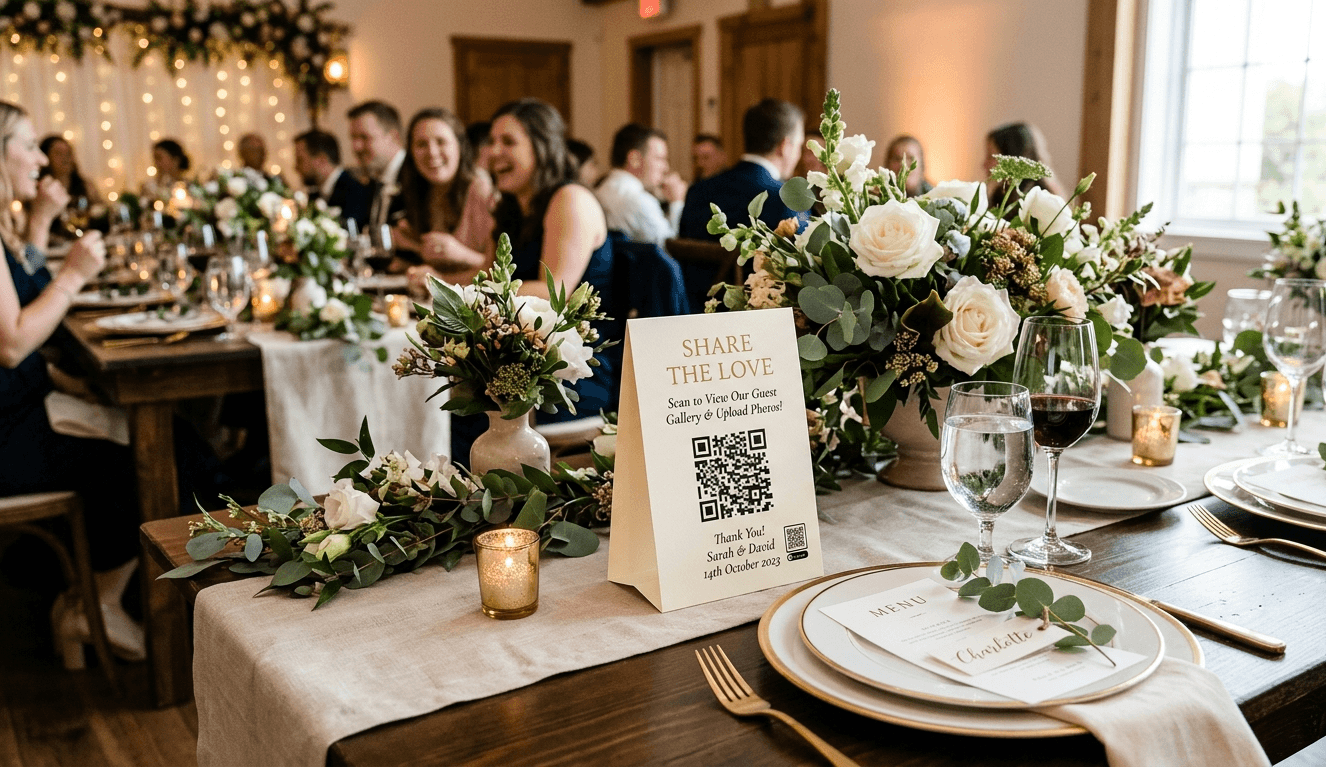
Wedding reception table with a QR code photo sharing sign surrounded by floral arrangements and guests in the background
IntroductionYour wedding day flies by in a blur of joy, tears, and celebration. When it's over, you're left with the professional photos—beautiful, perfectly lit, magazine-worthy shots. But what about the other 500+ photos your guests took? The candid moments your photographer missed? The hilarious reception shenanigans? Those behind-the-scenes getting-ready photos your bridesmaids snapped?Those photos are scattered across 50+ phones, and getting them all in one place feels like herding cats.I built PicStashio after my brother's destination wedding in Maui. He'd paid for one of the popular photo-sharing apps, and honestly? It felt dated—clunky upload flow, confusing UI, the kind of thing you tolerate but don't enjoy. As a software engineer, I kept thinking: this should be so much better than it is. So I built it.This guide will walk you through everything you need to know about collecting wedding photos from guests—including what works, what doesn't, and how to actually get those photos without losing your mind.Why Traditional Methods Fall ShortLet's be honest about the old ways of collecting wedding photos:The pitch: "Just create a Facebook event and have everyone upload their photos!"The reality:Not everyone has Facebook (or uses it anymore)Guests forget to uploadPhotos are compressed and lose qualityNo organization by person or timePrivacy concerns (who can see what?)The pitch: "Share a folder link and let guests upload directly!"The reality:Requires guests to have an account (friction)Confusing folder structuresGuests don't know how to use itFiles get randomly named (IMG_4739.jpg tells you nothing)No way to see photos in real-time during the eventThe pitch: Simple, direct, personalThe reality:You'll get maybe 20% of the photosTexting full-resolution photos is painfulEmail attachments are limited in sizeNo way to bulk downloadYou'll be chasing people for monthsThe pitch: "#SmithWedding2026 and watch the magic happen!"The reality:Photos are public (privacy concerns)Instagram compresses everythingNot everyone posts on InstagramHashtags get hijacked by spamCan't easily download all photosAll these methods add friction, require guests to remember, or sacrifice quality.What Actually Works: The QR Code RevolutionHere's what we've found works best for collecting wedding photos:The winning formula:Zero friction for guests — No app downloads, no account creationInstant gratification — Photos appear in real-time as guests uploadFull quality — Original resolution, not compressed garbagePrivacy by default — PIN/Password-protectedOne central place — Everything organized automaticallyThe secret weapon? QR codes.QR codes solve the #1 problem with photo collection: remembering to do it later.Instead of:Guest takes photoGoes homeForgets about itYou text them 3 weeks laterThey can't find the photo anymoreEveryone is frustratedIt becomes:Guest sees QR code at receptionScans it with their phone cameraUploads photos immediatelyDoneWhen guests are still at your wedding, they're excited and engaged. They WANT to share their photos. Three weeks later? They've moved on with their lives.QR code tent card on a wedding reception table for guest photo uploadsThe Step-by-Step Plan to Collect All Wedding Photos1. Set up your photo collection systemWhether you use PicStashio, GuestPix, or another tool, get it set up early. You'll need:A unique event link (PicStashio has free custom URLs)QR codes generated (we'll talk about displaying these next)Test the upload flow yourself. Take out your phone, scan the QR code, try uploading a few photos. Does it work smoothly? If you're confused, your guests will be too.2. Design beautiful QR code displaysThis is where presentation matters. A boring black-and-white QR code printed on regular paper won't cut it.Make it:Beautiful — Match your wedding aestheticClear — Large enough to scan from 3 feet awayCompelling — Tell guests WHY they should scan itShare Your Photos! Scan this code to upload your photos & videos. See everyone's shots in real-time! No app required • Full resolution • Private galleryWhere to display QR codes:Guest tables (one per table or tent cards)Near the entrance/welcome signAt the bar (people check their phones here)Near the dance floorIn restrooms (seriously—people check phones here too)On the back of ceremony programsDesign options:Canva has free wedding templates (if using GuestPix, they have 180+ templates)Hire a designer on Fiverr ($20-50)Print on elegant cardstock or acrylic signsMatch your wedding colors and fonts3. Brief your wedding partyYour bridesmaids, groomsmen, and close friends are your evangelists. Tell them:Where the QR codes areHow to scan and uploadAsk them to encourage other guests"Hey! Make sure you scan the QR code at your table to share your photos. It's so easy and we can all see them in real-time!"4. Make an announcementDuring cocktail hour or early reception, have your DJ or MC make a quick announcement:"Before we get started, the bride and groom would love to see all YOUR photos from today! You'll find QR codes on each table—just scan with your camera, no app needed. Let's fill up that gallery!"Keep it brief (15-20 seconds max), but make sure everyone hears it.5. Lead by exampleHave your wedding party upload photos first. When guests see the gallery filling up with fun photos, they'll want to contribute too.An empty gallery feels awkward to be the first to post in. A gallery with 20 fun photos already? Everyone wants to join in.6. Send a thank you reminder (1-3 days later)Send a message to all guests with the QR code or direct link:"Thank you so much for celebrating with us! We'd love to see any additional photos you took. Here's the link to upload: [LINK]. Everything is private and we'll download all photos to keep forever. Thank you!"7. Follow up with key people (1 week later)Text specific people you know took lots of photos:Your best friend who was snapping everythingThe uncle with the fancy cameraThe cousins who were always on their phones"Hey Sarah! We saw you taking some amazing photos at the reception. Would you mind uploading them to our gallery? [LINK] Thank you!!"8. Set a deadline (2-3 weeks later)Send one final reminder with a gentle deadline:"Final call for photos! We're collecting all the photos from our wedding into one place to download and treasure forever. Please upload any photos you have by [DATE]. Link: [LINK]. Thank you for being part of our special day!"Without a deadline, "I'll do it later" becomes "never." A specific date creates urgency.9. Download everythingOnce you've collected all photos, download them immediately:Bulk ZIP download (if available)Organize by person/timeBack them up to multiple places (Google Photos, iCloud, external hard drive)Most photo collection services delete events after a certain period (30-90 days). Download and backup immediately!10. Create a highlights albumPick the best 50-100 photos (professional + guest photos) and create a shareable album for family. This is also great for:Thank you cardsAnniversary postsHoliday cards next yearCommon Mistakes to AvoidWaiting until after the wedding to set up photo collection — By then, the moment is gone. Guests have moved on.Only putting QR codes in one location — People won't go searching for it. Put them everywhere.Making it complicated — "Download this app, create an account, verify your email..." = no one will do it.Not testing the upload process — If it doesn't work seamlessly on YOUR phone, it won't work for your guests.Forgetting to announce it — Assume no one reads signs. Tell people verbally.Not following up — Most photos come from your follow-up messages, not the day-of.Letting the event expire before downloading — Back up your photos immediately!What to Look for in a Photo Collection ToolIf you're comparing options ( PicStashio, GuestPix, or others), here's what matters:QR code generation — Makes uploading effortlessNo app required — Guests can upload from mobile webFull resolution — Original quality, not compressedReal-time gallery — Photos appear instantlyPrivate/password-protected — Not publicBulk download — ZIP download of everythingWorks on all devices — iPhone, Android, desktopVideo support — Not just photosReactions/likes — Let guests react to photosMultiple events — If you have multiple wedding eventsBranded design — Customize to match your weddingCanva templates — Pre-made QR code designsiOS/Android app — For hosts who prefer appsRequires all guests to download an appRequires guests to create accountsCompresses photos (Instagram-level quality)Expires too quickly (less than 30 days)No bulk download optionHidden costs or surprise feesWhy I Built PicStashioDan Broadbent, founder of PicStashioFull transparency: PicStashio is a new product. After using a clunky photo-sharing app at my brother's Maui wedding that he'd paid for, I knew there was room for something better, but nothing on the market quite nailed it.What I focused on:Zero friction — Guests scan a QR code, upload immediately, doneReal-time uploads — Photos appear instantly so guests get excited and upload moreFull resolution — No compression, no quality lossWorks on any device — Web-based, so it works on any phone and any browserWhat I'm still building:Canva integration for custom QR code designsMore gallery theme customizationI'm early and building in the open. If something matters to you, let me know.The Bottom LineCollecting wedding photos from guests doesn't have to be a nightmare of forgotten promises and lost memories.The formula that works:Set up QR codes before the weddingDisplay them everywhereMake an announcementFollow up 2-3 times afterDownload and back up everythingThe tools that work:QR code-based photo collection (PicStashio, GuestPix, others)No app requiredFull resolutionReal-time uploadsThe mindset that works:Make it effortless for guestsCapture the moment while it's happeningFollow up personallyBackup everything immediatelyYour wedding photos tell the story of your day—not just the posed, perfect moments, but the real, raw, joyful chaos of celebrating with the people you love most.Don't let those memories stay trapped on guest phones.Collect them, treasure them, and relive your wedding day for years to come.Frequently Asked Questions2-4 weeks before the wedding. This gives you time to print QR codes, test the system, and brief your wedding party.One for every 2-3 tables, plus extras at high-traffic areas (bar, entrance, near the dance floor).Most smartphones (iPhone, Android) have QR scanning built into the camera app now. Just point and tap. That said, have a few tech-savvy guests ready to help if needed.They won't be able to upload on the spot, but you can follow up via email with a direct link after the wedding.Yes! Most modern photo collection tools support video uploads. Check your specific tool's file size limits.This varies by tool. Most keep events for 30-90 days. Download and backup immediately after collection closes.Use password-protected galleries. Share the password only with actual guests (not publicly).Most wedding photo collection tools range from $29-$149 for a single event. Try PicStashio free or our paid tiers start at $39. That's a fraction of your photography budget for ensuring you don't lose hundreds of candid moments.Absolutely! This works for birthday parties, corporate events, reunions, bar/bat mitzvahs—any event where multiple people are taking photos.

Dan Broadbent

Founder, PicStashio

Dan is a software engineer who built PicStashio after his brother's Maui wedding. Guests scan a QR code, upload their photos—no app required—and everything lands in one private, full-resolution gallery. Because collecting photos from guests shouldn't require a project manager.

Couple sitting together on a couch reliving their wedding day by browsing guest photos on a laptop

Ready to collect all your wedding photos without the stress?

QR code uploads · Full resolution · Zero app required

Create Your Stash — Starting at $39